

Every accreditation season brings the same scene. HODs dig through cupboards. Faculty search old pen drives for reports. IQAC coordinators chase signatures that should have been collected months ago. This happens because most colleges treat department files as a last-minute task instead of a running system.
A department file checklist fixes this. It gives every department a fixed structure for department documentation, so evidence sits ready long before accreditation files are requested by NAAC, NBA, or NIRF committees. This guide breaks down what a department file checklist should include, how to build one, and how to keep it alive all year, not just during audit season.
If you need criterion-wise detail, our NAAC documentation checklist for colleges covers NAAC evidence in depth. If your department is preparing for engineering accreditation, see our NBA documentation checklist for departments for OBE and CO-PO records. This article focuses on the master filing system every department needs, regardless of which accreditation body is asking for evidence.
Why Every Department Needs Its Own File Checklist
Departments generate most of an institution’s evidence. Attendance, results, faculty credentials, research output, and student activities all begin at the department level. When these records are scattered, the whole institution’s accreditation files suffer, no matter how strong the IQAC office is.
This is not only a compliance issue. It also affects morale. When a department scrambles every year to rebuild proof of work that already happened, faculty start to see documentation as a burden rather than a normal part of academic life. A predictable filing habit changes that perception over time.
A structured department file checklist helps in four clear ways:
- It assigns responsibility, so no file becomes ‘nobody’s job.’
- It cuts audit-season panic by spreading the work across the year.
- It keeps accreditation files aligned across NAAC, NBA, and NIRF submissions.
- It prevents data mismatch between department records and central AISHE or ERP data.
What a Department File Checklist Actually Covers
A department file checklist is a working list of every record a department must keep, update, and present as evidence. It is not a one-time document you prepare and forget. It is a system that departments revisit every semester.
Good department documentation should map directly to what accreditation agencies ask for, so nothing depends on memory when a peer team, DVV clarification, or internal audit arrives without warning.
Who Should Maintain the Department File Checklist
A checklist only works if someone is actually responsible for it. Most institutions divide this responsibility across four roles, and each role should know exactly what part of the department documentation belongs to them.
- The HOD, who signs off on department-wide compliance and reviews the checklist every semester.
- A department quality coordinator, who tracks day-to-day updates and flags missing evidence early.
- Subject or committee in-charges, who own specific files such as research records or lab logs.
- The IQAC office, which cross-checks department files against institutional AQAR and SSR submissions.
When these four roles are clearly defined, a department file checklist stops being a burden on one overworked coordinator and becomes a shared, sustainable habit.
Core Categories Every Department File Must Have
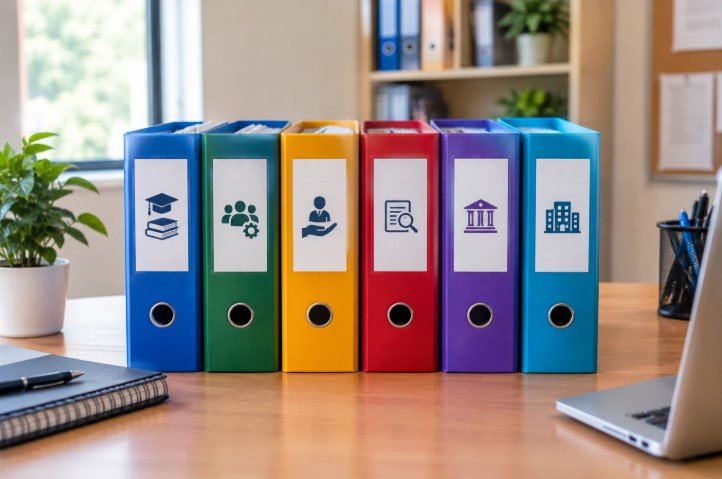
Use these six categories as the backbone of your checklist. Every department, regardless of discipline, needs some version of each.
1. Academic Records
- Syllabus copies, lesson plans, and timetables
- Attendance registers and internal assessment records
- Result analysis and pass percentage trends
- Sample question papers and evaluated answer scripts
2. Faculty Documentation
- Appointment letters and qualification certificates
- Faculty profile and CV update logs
- Orientation, FDP, and workshop attendance certificates
- Faculty performance appraisal records
3. Student Support Records
- Mentor-mentee interaction logs
- Remedial and bridge class records
- Placement, internship, and higher-studies tracking files
- Student grievance and feedback records
4. Research and Publication Files
- Paper publication proofs with DOI or ISSN details
- Patent, project, and consultancy files
- Conference participation and presentation certificates
- Funded project sanction letters and utilization reports
5. Committee and Governance Files
- Departmental committee meeting minutes
- Board of Studies and academic council records
- Quality initiative and improvement reports
- Best practice and innovation documentation
6. Infrastructure and Facility Records
- Lab manuals and equipment maintenance logs
- Library resource utilization by department
- Safety, calibration, and compliance certificates
- Asset registers specific to the department
Not sure which of these your department is missing?
Get a Department File Audit from BGC and receive a clear, criterion-mapped gap report before your next accreditation cycle.
How to Build a Department File System Step by Step

Step 1: Create a Master Folder Structure
Build one structure, both physical and digital, that mirrors your file categories. Use a consistent naming pattern such as Department–Category–Academic Year. This makes files easy to find and easy to hand over when staff change.
Step 2: Assign File Ownership
Every category needs one named owner, not a vague instruction to ‘the department.’ Ownership is what prevents files from becoming everyone’s problem and no one’s task.
Step 3: Set a Review Calendar
Review files every semester, not once a year before the visit. Small gaps caught early stay small. Gaps left for three years become a documentation crisis.
Step 4: Digitize and Back Up Evidence
Scan physical proofs, use a shared institutional drive, and keep an index sheet that lists what exists and where. A clear digital trail is easier to defend during DVV clarification or a sudden peer team visit.
Setting this up alone can take months of trial and error?
Book a free consultation with BGC and get a ready-to-use filing framework built around your institution’s structure.
Common Mistakes Departments Make with Documentation
- Keeping files only on one faculty member’s personal laptop, so the record disappears the moment that person is on leave or transfers out.
- No version control between the department copy and the IQAC copy, which creates two slightly different versions of the same story.
- Updating files only after a deadline circular is announced, instead of treating documentation as routine work.
- Mixing personal notes and institutional records in the same folder, which slows down anyone searching for verified evidence.
- No cross-check between AISHE, ERP, and department-level numbers, which is one of the most common reasons DVV clarifications get raised.
Each of these mistakes looks small on its own. Together, they are usually why DVV clarifications and peer team queries take institutions by surprise, even when the underlying academic work was genuinely strong.
How This Checklist Helps During a Peer Team Visit or DVV Clarification

Peer team visits and DVV clarification windows both share one trait: very little advance notice and very little patience for missing evidence. A department that already follows a file checklist can respond to either situation the same way, calmly.
- Every claim in the SSR or AQAR has a matching, dated proof sitting in a known folder.
- Faculty can locate a specific record in minutes instead of days, because ownership and naming are already fixed.
- Cross-checking a DVV query against department numbers takes one lookup, not a department-wide search.
This is the real value of a department file checklist. It does not just prepare you for the visit itself. It removes the panic that usually surrounds it.
Department File Checklist vs Accreditation-Specific Checklists
A general department file checklist is not a replacement for criterion-wise guides. Think of it as the base layer. Once department documentation is organized under this checklist, mapping it to specific requirements becomes far easier. For criterion-level detail, read our NAAC documentation checklist for colleges. For engineering departments preparing outcome-based evidence, use our NBA documentation checklist for departments. Both build on the same foundation described here.
Research Files Need Special Attention
Research and publication files are the ones colleges struggle with most. Faculty publish across many journals, and proof of DOI, ISSN, or indexing status often lives outside institutional systems rather than in the department file. Publishing in a peer-reviewed, properly indexed journal makes this evidence far easier to defend later. Mantech Publications’ guide on how to get a step-by-step NAAC accreditation roadmap is a useful companion read, since it explains how research output ties directly into your final score.
If your faculty need help getting research published correctly, with a citable DOI and indexing, research paper publication support from Mantech Publications can take a manuscript from submission through to a verifiable, accreditation-ready proof of publication.
Keep one simple rule for this category: a research file is not complete until the proof of publication, the indexing status, and the faculty member’s contribution are all in the same folder. Splitting these across email inboxes and personal drives is the single biggest reason research evidence goes missing at review time.
Why Organized Files Also Help You Attract Students
Accreditation-ready departments do more than pass audits. They build institutional credibility that students notice. Once your NAAC or NBA grade improves, prospective students actively search for verified information before applying. Getting listed on BhavyaGyan’s verified college directory puts your accredited programs in front of students who are comparing colleges by course, city, and accreditation status. You can also browse NAAC consultancy resources on BhavyaGyan to see how accreditation status shapes student decision-making.
Quick-Reference Department File Checklist
- Syllabus, timetable, and attendance records
- Faculty qualification and appraisal files
- Student mentoring and placement records
- Research, patents, and consultancy proof
- Committee minutes and best-practice reports
- Lab, library, and safety compliance records
- A digital backup with a master index sheet
Want a printable version your department can start using this week?
Conclusion
A department file checklist is not extra paperwork. It is the difference between departments that scramble every accreditation cycle and departments that walk into a peer visit prepared. Start small: pick one category, assign an owner, and build outward from there. Over time, your accreditation files will practically maintain themselves.
The institutions that handle NAAC, NBA, and NIRF cycles with the least stress are rarely the ones with the most resources. They are the ones that treat department documentation as routine, not as an emergency that resurfaces once every few years.
Need help setting this up correctly the first time?
BGC’s criteria-wise documentation support and documentation and evidence audit services can map your existing department documentation directly to NAAC, NBA, and NIRF requirements.
FAQs:
A structured list of records every department must keep for accreditation and audits.
Every semester, not just before an accreditation visit.
A named faculty coordinator per category, supervised by the HOD and IQAC.
No. It supports NAAC, NBA, and NIRF documentation needs equally.
Yes, but digitize as you go to avoid a last-minute backlog.
Yes, through department audits and documentation support services.
Evidence gets rebuilt in a rush, which raises the risk of DVV objections.




2 thoughts on “Department File Checklist for Colleges: A Practical Guide to Organized Accreditation Files”