

A peer team does not start in your library. It starts on your website. If key files are missing, old or hard to find, doubt begins before the visit.
This guide lists the NAAC website documents every college should upload. It also shows how to organise accreditation uploads and public disclosure files so anyone can find them in two or three clicks. It is written for principals, IQAC coordinators, NAAC coordinators and web administrators.
This post is about the files themselves. For menu and page layout, read our guide on website structuring for accreditation. For a page-by-page audit, use the NAAC website compliance checklist.
Want the full list beside you while you read?
Why NAAC Website Documents Matter
Your website speaks for your college when no one is in the room. Reviewers, parents and students all use it. Each group looks for different files, but all of them look for proof.
NAAC is also changing how it assesses colleges. Mantech Publications explains the NAAC binary accreditation and MBGL system in simple steps. Rules and formats can change, so always check the latest notices on the official NAAC website before you publish anything.
Public documents and portal evidence are not the same
Not every file belongs online. Some evidence goes only to the NAAC portal. Some stays inside your college. Your website should carry the documents that build public trust and show that your college is open about its work.
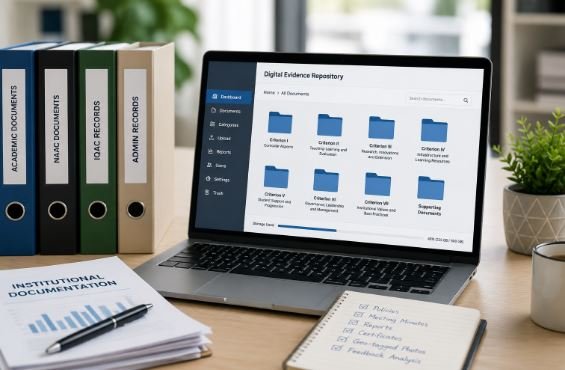
Keep full evidence in a safe internal system. A digital evidence repository helps you link each public claim to its proof without making every file public.
Who reads your website
- Peer team members look for the SSR, AQARs and IQAC records.
- Parents look for fees, approvals and placement details.
- Students look for courses, faculty and policies.
- Regulators look for approvals and public disclosure items.
Core NAAC Website Documents Every College Should Upload

Start with the basics. These files prove who you are and who recognises you.
1. Identity and approval documents
- Affiliation or permission letters from your university or state authority
- UGC recognition letters, where they apply to your college
- AICTE, PCI, NCTE or other council approvals, where they apply
- Latest NAAC accreditation certificate and outcome letter
- Trust, society or management registration details
Show the issue date and validity beside each file. Remove expired letters or mark them clearly as old.
2. Governance documents
- Vision, mission and core values
- Governing body list and key committee lists
- Organisation chart
- Service rules and code of conduct
- Annual report, signed and dated
3. Academic documents
- Programme list with duration, intake and eligibility
- Syllabi and course outcomes for each programme
- Academic calendar and examination rules
- Department pages with activities and achievements
- Summary of results, without personal student data
4. Faculty and staff information
Publish a faculty list with name, designation, qualification and department. Do not publish phone numbers, home addresses or ID numbers. Share only what the public needs to see.
5. Student-facing documents
- Admission process and prospectus
- Scholarship and fee-waiver details
- Anti-ragging policy and grievance redressal process
- Internal Complaints Committee details
- Placement and progression summary
Not sure which of these files your website already has?
Accreditation Uploads Reviewers Look For First

These are your accreditation uploads. Many peer teams open them before anything else.
SSR and AQARs
Upload your Self-Study Report in a public, open PDF. Add every Annual Quality Assurance Report in year order. Do not lock them with a password. If you need help with these files, see BGC’s pages on SSR preparation and AQAR support.
IQAC documents
Your IQAC page should show members, roles and contact details. Add dated meeting minutes, action plans and action-taken reports. Our overview of IQAC services explains what a strong IQAC record looks like.
Best practices and institutional distinctiveness
Give each of these its own page. Add a short write-up, the year it began and a few proof points such as photos, reports or outcomes. Keep it factual and avoid long claims.
Feedback reports and action taken
Publish the summary of student, teacher, alumni and employer feedback. Then show what the college did about it. Bhavya Gyan Academy explains how to collect student feedback in colleges in a way reviewers can trust.
Other quality records
- Academic and administrative audit reports, in summary form
- Green, energy or environment audit reports
- MoUs, collaborations and extension activity reports
- Gender equity and inclusion policies
Public Disclosure Documents: Keep Them in One Place

Public disclosure means facts that regulators and the public expect to see. Different bodies ask for different items. These may include UGC, AICTE, PCI, NCTE, your state authority and your university. Check the latest list from each one on the University Grants Commission and AICTE websites.
Do not scatter these files across the site. Build one disclosure section and link it from the menu and the footer. BGC’s page on institutional transparency pages shows how such a section can work.
A good public disclosure section usually holds these items:
- Approvals, affiliation and recognition letters
- Accreditation status, grade or level, and validity
- Fee structure and refund policy
- Sanctioned intake and admitted students, programme-wise
- Faculty list with qualifications
- Audited financial statements, where applicable
- Key policies such as anti-ragging, grievance and admission
Add a “last updated” date to every item. It tells visitors that someone manages the page.
Research, Library and Extension Documents
Research and library records matter for several NAAC areas. Your website can show them in a simple way.
- Research policy and research ethics policy
- List of faculty publications and books, with year and journal
- Details of research projects, patents or consultancy, where they exist
- Library resources, including journals and e-resources
- Extension and outreach activity reports
If your library needs peer-reviewed titles, Mantech Publications offers journal subscription for colleges. Make sure the subscription details match what you show on the website.
What You Should Not Upload
More is not always better. Some files should stay private.
- Student marks lists or any file with names and personal data
- Phone numbers, home addresses and ID numbers of staff or students
- Draft, unsigned or unapproved documents
- Internal notes, emails and working sheets
- Confidential financial or legal papers that are not meant to be public
Follow the privacy rules that apply to your college. When in doubt, ask your management or legal advisor before you publish.
File Rules That Make Uploads Easy to Use

Good documents fail when the files are messy. Use these simple rules.
- Format: Use PDF for reports and policies.
- Searchable text: Avoid scanned images with no text.
- Names: Follow one pattern, such as Topic-Year-Document-Version.
- Folders: Group by topic, then by year.
- Dates: Add the issue date or approval date to each file.
- Links: Keep the same web address when you replace a file.
- Access: Do not use passwords on public files.
For a full upload plan, see BGC’s data upload structuring service. Test the site on a phone too. Many users browse on mobile, and some use screen readers. The Web Content Accessibility Guidelines are a good base.
Match your numbers everywhere
Colleges report the same data in many places. These include the AQAR, AISHE, NIRF and the website. If numbers differ, reviewers ask questions. Mantech Publications explains why this matters in its article on the One Nation One Data Platform. BGC also supports accreditation data management.
Extra Documents for Professional Colleges
Different colleges need different files. Professional institutions should add a few more items.
- Pharmacy and nursing colleges: council approvals, inspection letters, clinical or practical training details and intake records.
- Engineering and management colleges: AICTE approval, programme outcomes and industry tie-up details.
- Teacher education colleges: NCTE recognition, school partnership records and practice-teaching reports.
- Autonomous colleges: academic council decisions, board of studies lists and examination reforms.
Always check your own regulator’s latest list. Your university or state authority may also ask for more items.
A 30-Day Plan to Finish Your Uploads

If your site has many gaps, do not try to fix everything in one day. Use a simple plan.
- Week 1: List every document you should upload. Mark each as Available, Old or Missing.
- Week 2: Upload approvals, the accreditation certificate, the SSR and all AQARs.
- Week 3: Add IQAC records, feedback reports, best practices and policies.
- Week 4: Set up the disclosure section, fix file names, test links and match all numbers.
Get the principal’s sign-off at the end. Then keep a short change log so you know who updated what and when. If your team is short on time, BGC’s NAAC website compliance services can run this plan with you.
Who Should Own Each Upload?
A website fails when nobody owns it. Give each area a name.
- IQAC coordinator: reviews all accreditation uploads every quarter.
- Department heads: send verified updates by a fixed date each month.
- Web administrator: publishes files, tests links and keeps backups.
- Principal or registrar: approves policies and public disclosure items.
Training helps here. The IQAC Management and NAAC Preparedness course from Bhavya Gyan Academy is built for IQAC teams. You can also see the programmes for principals and IQAC heads.
Want your IQAC team trained to manage uploads with confidence?
A Simple Upload Calendar
Do not treat uploads as a one-time task. Use this rhythm.
- Monthly: add new reports, minutes, events and notices.
- Every quarter: check dates, broken links and missing files.
- Every year: upload the new AQAR, annual report and audited statements.
- After any change: update approvals, policies and committee lists at once.
A yearly documentation audit catches what your monthly routine misses. Most problems start as small documentation gaps in colleges, so fix them early.
Common Mistakes to Avoid
- Burying key files deep inside menus
- Leaving expired approvals and old policies online
- Uploading files with no date or sign-off
- Showing different numbers on different pages
- Using file names like “scan1.pdf”
- Updating the website only before a visit
How BGC Can Help
Bhavya Gyan Consultants (BGC) works with colleges, universities and professional institutions across India. The team reviews your website files, builds disclosure sections and trains your staff. This work fits with wider NAAC accreditation consultancy, so your website and your records tell the same story.
You can also add your college to the BhavyaGyan platform. Students can explore colleges there and compare options. For a step-by-step view of the whole process, read Mantech Publications’ guide on how to get NAAC accreditation.
Ready to make your website accreditation-ready?
Conclusion
The right NAAC website documents show your college is open, organised and ready. Start with approvals, the SSR, AQARs and IQAC records. Add clear public disclosure files. Date every upload and review it often. Do this well, and your website becomes living proof of quality.
FAQs:
SSR, AQARs, accreditation certificate, IQAC records, approvals, fees and key policies.
Public files linked to accreditation, such as the SSR, AQARs, IQAC minutes and feedback reports.
Sharing facts regulators and students expect, such as approvals, fees, intake, faculty and policies.
No. Publish trust-building documents. Keep full metric evidence for the NAAC portal and internal records.
Review monthly. Update at once after any new AQAR, policy, approval or committee change.
Yes. Dated PDFs, a clear menu and a simple monthly routine matter more than design.
External Resources
- NAAC (National Assessment and Accreditation Council) – Official manuals, guidelines and notices.
- University Grants Commission (UGC) – Regulations and notices for higher education.
- AICTE – Approvals and disclosure norms for technical institutions.
- NIRF – Ranking framework and data formats.
- AISHE – National higher education data portal.
- W3C Web Content Accessibility Guidelines – Web accessibility standards.


1 thought on “What Colleges Should Upload on Their Website for NAAC”